How to Automate a Small Business Process with n8n: A Planning and Testing Checklist
By Farzam Saadat | Published | 11 min read
To automate a small business process with n8n, define the input and expected result, build the workflow in small stages, test normal and failure cases, and assign someone to operate it after launch. A successful manual execution is useful evidence, but it does not prove that real triggers, repeated events, or partial failures will behave correctly.
This guide turns an agreed process into an implementation checklist. It assumes you have already selected the task and confirmed that n8n can perform the required integrations. If you are still evaluating software, use the business process automation tools guide.
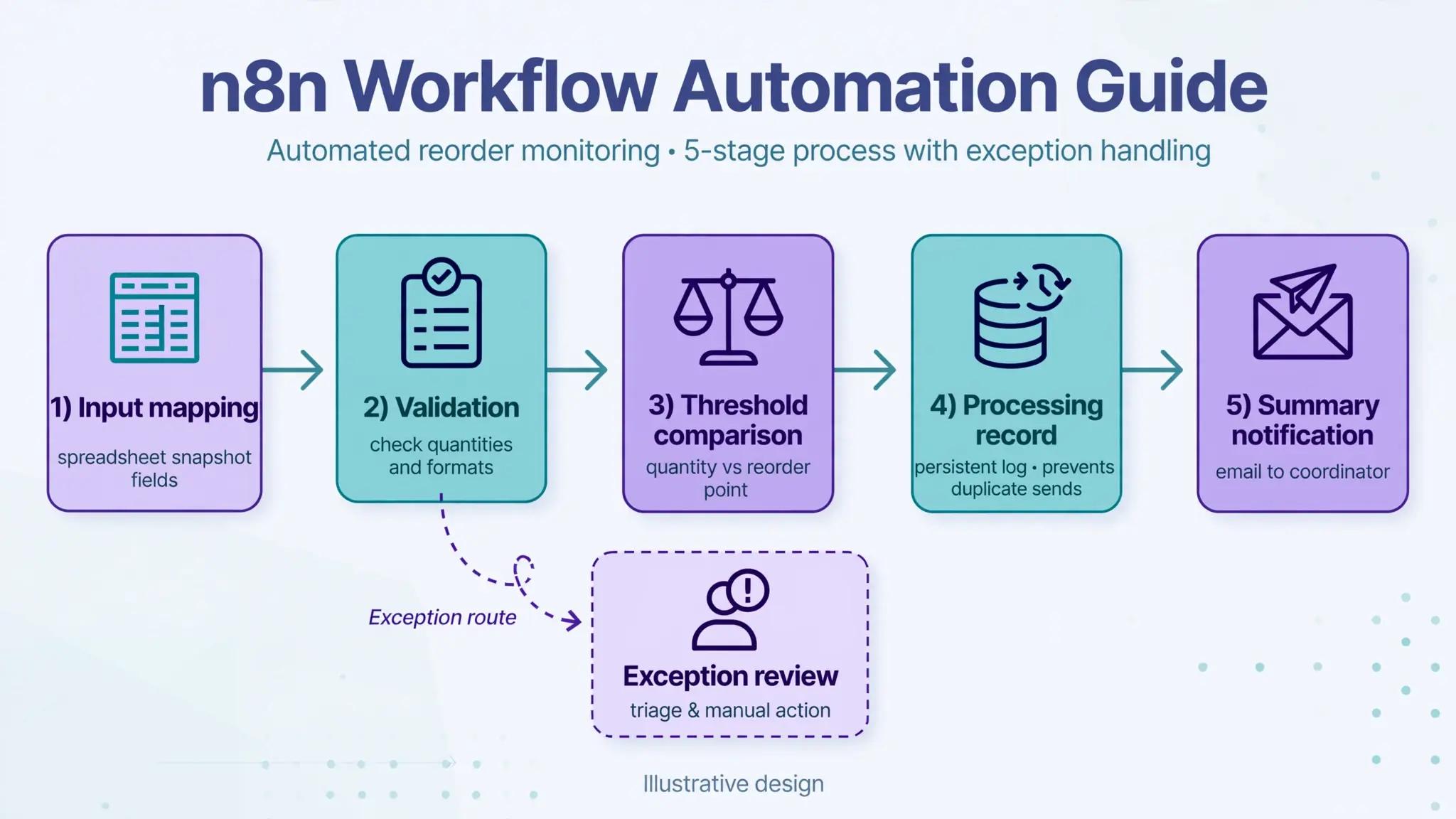
The worked example is an internal low-stock notification for office supplies. It is deliberately narrow: read a controlled inventory snapshot, validate quantities, and notify the supplies coordinator about items below their chosen threshold. It does not create purchase orders or promise that the inventory figures are correct. The example is proposed guidance, not a claim about a deployed client workflow.
1. Write the acceptance criteria before building
State what must be true at the end of a run. In this example, valid below-threshold items from one snapshot should appear once in a summary for the coordinator. Invalid records should appear in a separate exception result. A run with no qualifying items should record that outcome without sending an empty alert.
Specify the threshold comparison: alert when available quantity is less than the chosen reorder point. Equality does not qualify in this example. Decide whether negative values are allowed; here they require review because the source represents physical office stock. These are sample business rules, not universal inventory policies.
Also state the limitations. This first version does not calculate purchasing quantities or account for incoming orders. Use it only where the business accepts that scope. If you need those features, add their fields, rules, and tests explicitly rather than silently assuming that a low-stock alert is a replenishment plan.
2. Define a data contract
A data contract is a short specification of the fields and formats the workflow expects. It explains what is required, what can be blank, and how an invalid value is treated.
| Field | Expected meaning | Validation |
|---|---|---|
| snapshot_id | Stable identifier for a source snapshot | Required; reused on retries |
| item_id | Stable stock-item reference | Required and unique within snapshot |
| quantity | Available physical units | Numeric, zero or positive in this example |
| reorder_point | Business-selected alert boundary | Numeric, zero or positive |
| snapshot_ready | Source-owner readiness signal | Must indicate an accepted snapshot |
For example, snapshot SNAP-101 contains item PEN-BLUE with quantity 8 and reorder point 10. That record qualifies. A quantity of 10 does not. A blank quantity needs review rather than being converted silently to zero. Keep the original source value when a correction or conversion is made.
Use source identifiers for identity. A newly generated identifier on every retry cannot tell you that the underlying event has already been processed. Agree how snapshots are created and whether records can change after the snapshot is marked ready.
3. Build with isolated destinations
Use sample rows and a dedicated test recipient. Start with a manual trigger while checking mappings, and keep customer-facing or purchasing actions out of the test path. Separate test and production credentials or resources where practical, and grant only the operations the workflow needs.
Build the read step first, then inspect the actual fields. Next, map them into consistent names and types. The Edit Fields documentation explains how n8n sets or overwrites fields. Preserve identifiers and other data needed later when deciding which fields remain in the output.
Add validation before the business comparison. After invalid rows have been separated, an If node can compare quantity with reorder point. Build the summary from qualifying rows, then send it only when there is something to report. Test the no-results path deliberately.
Avoid assuming that one input row means one execution or one final message. Inspect how many items each node receives and emits. In this design, several qualifying stock items should become one summary for the snapshot, not an accidental series of separate emails.
4. Prove the real trigger separately
A manual trigger proves only the tested execution path. For a scheduled version, choose the timezone explicitly, check the intended run time, and confirm that the source snapshot is ready. A schedule firing successfully while reading yesterday’s incomplete data is not the desired business outcome.
If the business instead sends a webhook when a snapshot is ready, verify the sender’s authentication and the expected payload. The n8n Webhook documentation distinguishes test and production URLs. Use the production configuration for the live integration after the relevant workflow version is enabled or published in your installation.
Check your installed version’s controls rather than relying on a screenshot from another release. Record the n8n version, source configuration, and release date in the handover notes. Remove or refresh pinned development data before checking production behavior so the test uses real input.
5. Use a test matrix with expected outcomes
Record the input, expected result, observed result, and evidence for each case. Evidence may be a destination record, execution reference, or test email. A green node does not establish that the right values reached the right person.
| Input or event | Expected result | Evidence to retain |
|---|---|---|
| Quantity 8, threshold 10 | One qualifying item in summary | Summary and source reference |
| Quantity 10, threshold 10 | No low-stock alert for that item | Comparison result |
| Blank or invalid quantity | Exception; not silently zero | Exception reason and original value |
| Several eligible items | One summary for the snapshot | Item count and message content |
| Same snapshot replayed | No unexamined repeat send | Processing record and outcome |
| Provider timeout after send | Uncertain delivery investigated | Provider/execution reference |
| No qualifying items | Record no-alert outcome | Completion status without empty email |
Test mixed batches containing valid and invalid rows. Decide whether the workflow should continue with valid items and report exceptions, or hold the whole snapshot. In this example it reports invalid rows separately while processing eligible valid rows, and the coordinator can see that the snapshot needs attention.
Do not hide missing data behind a default merely to keep the execution green. A zero, false value, or empty list can be a legitimate result; it can also be a symptom of a failed lookup. Distinguish those states before continuing.
6. Design replay and failure recovery
Use a persistent processing record keyed to the source snapshot and notification purpose. Record the completed stages and the destination reference where available. On a replay, check that record before sending another summary. Protect concurrent claims with storage or application controls that enforce uniqueness; a spreadsheet lookup followed by a write is not an atomic lock.
Notification delivery deserves care. If the provider accepts an email but the workflow times out before recording success, an automatic retry could send it again. Where the provider cannot guarantee idempotent sends, mark an uncertain outcome for investigation and check available evidence before retrying. Do not claim exactly-once delivery from a simple status flag.
Use the n8n error-handling guide to configure an error workflow starting with Error Trigger. Link it to the main workflow and test it with a controlled failure from the actual trigger path. Separately alert on handled business exceptions that do not fail an execution.
Give the alert recipient enough information to locate the run and affected snapshot, without copying unnecessary sensitive data. Decide which failures permit a bounded retry, which need corrected input, and which need an operator. Repeatedly retrying invalid credentials will not repair them.
7. Launch with a reversible operating plan
Start with one controlled snapshot and a named coordinator watching the result. Confirm that the current production recipient, source identifiers, timezone, and workflow version are correct. Keep a manual notification route available while the first runs are observed.
Before launch, the owner should be able to confirm five points: all acceptance tests passed; credentials belong to the business or its authorized operator; failures reach an assigned person; repeat processing has a documented policy; and the workflow can be paused without losing track of unprocessed snapshots.
Disabling future triggers may not stop executions already in progress. When pausing, inspect active work and identify any actions that may already have completed. Recovering the workflow definition does not undo an email or another external action.
8. Hand over and review
Provide a short operating note with the purpose, source fields, mapping, rule, trigger, credentials owner, test evidence, recovery steps, and pause procedure. Include the version of the workflow being handed over and a record of later changes. Keep secrets in the appropriate credential store, not in screenshots or the written notes.
Measure completed snapshots, exceptions, repeated notifications, and time spent resolving failures. Confirm that the coordinator finds the summary actionable. If the source changes a column name or the business changes its stock policy, update the contract and rerun the affected tests.
Common questions
Does this checklist require AI?
No. The example uses defined fields and a numeric comparison. AI would add another output to validate without being necessary for the stated task.
Can I prototype with a spreadsheet?
Yes, for a controlled demonstration or a workload that fits its limitations. Confirm access, simultaneous edits, and replay handling before treating it as production infrastructure. The workflow’s storage requirements should determine the final choice.
When is the workflow ready?
When it meets the documented outcomes under representative inputs and failures, the real trigger has been checked, and the operator knows how to investigate and recover. Readiness is broader than one successful execution.
Build the evidence alongside the workflow
A practical n8n implementation includes both the automation and the information needed to trust and maintain it. Keep the scope small enough that you can explain each input, action, and exception.
To turn your process into a build specification and test plan, discuss your n8n implementation. Share the source data, desired result, and the failures your team needs to handle reliably.