Business Workflow Management: How to Map Tasks, Owners, and Approvals
By Farzam Saadat | Published | 9 min read
Business workflow management defines how work moves from a request to a completed result: which tasks happen, who owns the next action, what evidence is needed, and when approval is required. It includes manual decisions as well as automated steps. A useful workflow makes the next action visible without requiring someone to reconstruct it from messages.
A team can have a busy task board and still lose work between people. One employee marks an item “done” after sending an email, while the recipient assumes someone else is checking it. The issue is often an undefined handoff rather than a missing reminder.
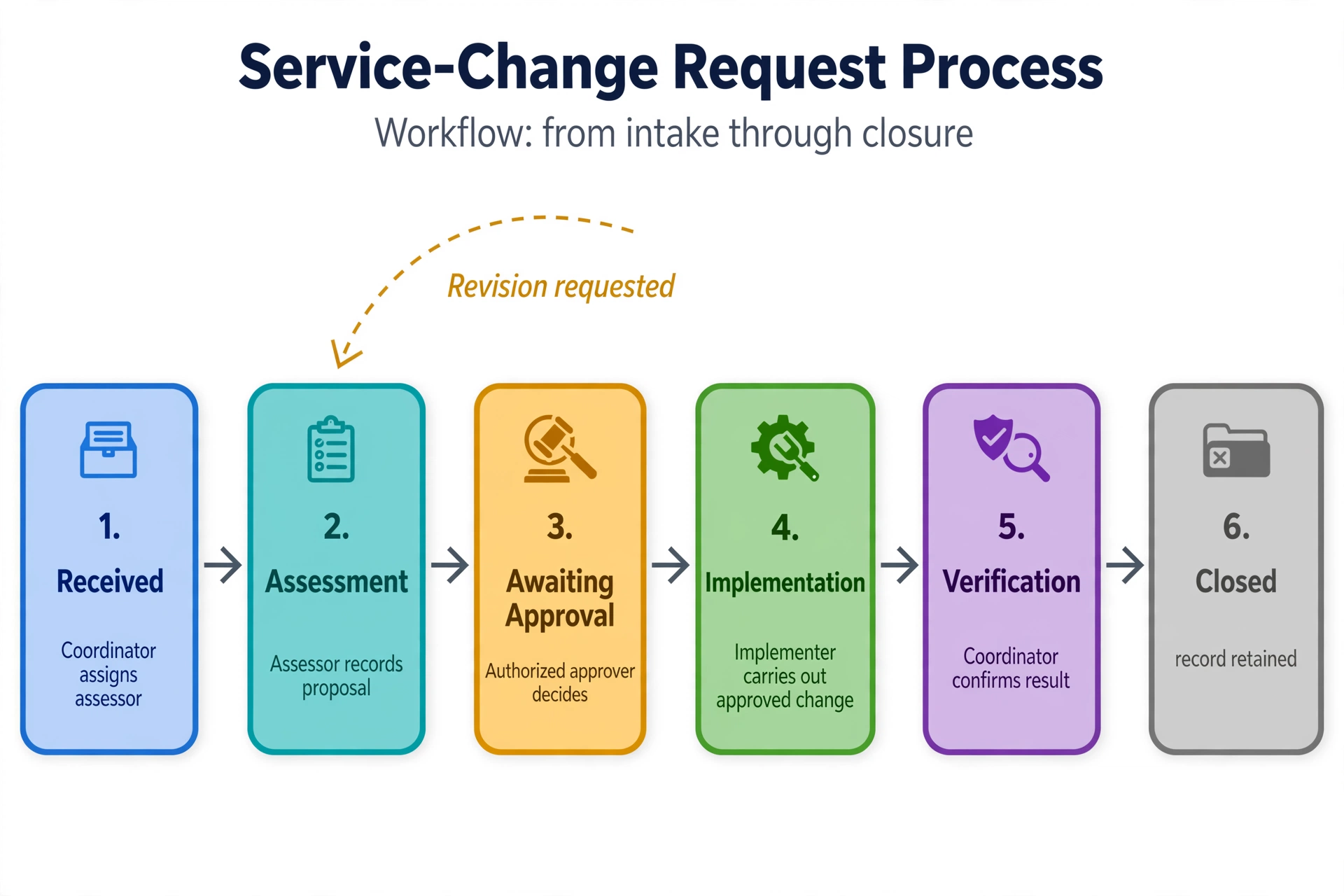
This guide uses a fictional service-change request to show how to map responsibilities and decisions. It is a process-design example, not a claim about a deployed client system. The goal is an operating procedure that people can follow before and after automation is introduced.
Distinguish managing a workflow from automating it
Workflow management establishes the sequence, ownership, and rules. Automation performs selected actions within that arrangement. Moving a record quickly into an unowned queue does not resolve the ownership problem.
Business process management is broader: it examines and improves processes over time. IBM’s overview of business process management describes this wider discipline. A small team can start with one documented workflow without attempting a company-wide transformation.
If you have not chosen the process, use the separate first-automation selection guide. Once the scope is chosen, agree how each item will move and who can authorize the transitions.
Define the unit of work and its boundaries
Name one identifiable item. For this example, it is a request to change an existing service arrangement. Give it a request reference, an affected-service reference, a requester, a description, and an owner. Related emails and files should point back to that item rather than become competing versions of the request.
Define the starting event as receipt through the agreed intake route. Define completion as an implemented change that has been checked against the approved scope and communicated to the requester. An approval alone does not meet that completion definition.
Observe a few actual cases before documenting the ideal path. Include a straightforward request, one returned for information, and one that was declined. Ask staff where they waited, who made decisions, and which records they relied on. Those observations reveal the handoffs your procedure must explain.
Give statuses an operational meaning
A status should tell a reader what is true now. “In progress” may be too broad when it includes assessment, waiting for approval, and implementation. Use a small set of states with clear entry and exit conditions.
| State | Current responsibility | Condition to move forward |
|---|---|---|
| Received | Coordinator | Assign an assessor; identify missing information |
| Assessment | Assessor | Record a proposal and its supporting evidence |
| Awaiting approval | Authorized approver | Approve the version, reject, or request revision |
| Implementation | Implementer | Carry out the approved change and record result |
| Verification | Coordinator or reviewer | Confirm result matches the approved scope |
| Closed | Record retained | Completion evidence and communication recorded |
Treat Rejected and Cancelled as explicit terminal outcomes with a reason. An item awaiting clarification should remain visible and owned; it should not disappear into an archive. Avoid adding a status unless it changes what someone needs to do or what can happen next.
Separate coordination, task ownership, and authority
The process owner maintains the overall rules and resolves recurring problems. The current task owner performs the next action on an individual request. The approver has authority to accept or decline the proposed change. The requester supplies the need and any missing information. One person may hold more than one role, but the distinctions should remain clear.
For each active state, identify a primary owner and a permitted substitute. A group inbox can be a destination, but a team label alone may not show who is acting on the item. Require someone to claim or receive assignment of the task.
Decide whether the person who prepares a proposal may also approve it. Use the organization’s actual authority rules. Where separate approval is required, the system should enforce it rather than merely displaying a warning that can be ignored.
Write the handoff as an agreement
The outgoing owner should know what must be supplied; the incoming owner should know what they are accepting. For assessment to approval, that might be the proposed scope, expected impact, supporting evidence, and request version. Missing information should return to a named person with a specific reason.
Record ownership changes alongside status changes. If a notification fails, the current owner should still be visible in the shared record. Email delivery is evidence that a message was sent, not evidence that a person accepted the task or made a decision.
Make approval rules explicit
Specify who can approve, which response completes the decision, and what happens after rejection or silence. “Send it to two managers” does not explain whether both must agree, either may decide, or one reviews only after the other.
Microsoft’s approval documentation illustrates different response models, including first response, everyone approving, and sequential approval. Whichever tool you use, choose the model that reflects your actual authority rules rather than accepting its default.
Tie approval to the proposal version. If the scope changes after approval, decide whether a new decision is needed and record it. A previously approved request should not silently authorize a different action because someone edited a description later.
Define a deadline and escalation route. An overdue approval should prompt follow-up or authorized reassignment, not silently become approved. Specify how absence, delegation, and conflicting responses are resolved. For an internal example, a team may choose two business days for review; that is its own target, not a general standard.
Worked example: a request that needs revision
A customer asks a fictional maintenance business to move a recurring service visit from Wednesday to Monday. The coordinator creates request CHG-204, links it to the service record, and assigns an assessor. The assessor checks availability and records a proposed Monday slot as version 1.
The authorized manager sees a staffing conflict and returns the proposal for revision, recording the reason. The request moves back to assessment with the assessor as owner. It is not marked complete, and the coordinator does not tell the customer that the change is confirmed.
The assessor proposes a different Monday slot as version 2. The manager approves that version. The implementer updates the scheduling system using the approved details and saves the resulting reference. The coordinator verifies the updated arrangement, communicates it through the agreed channel, and closes the request.
If the customer changes the requirement before implementation, pause and reassess the proposal. If the scheduling update fails, keep the request in an explicit exception condition with an owner. Neither circumstance should inherit a “closed” status merely because an earlier approval exists.
This example separates three facts: the proposal was approved, the system was updated, and the result was checked. Keeping those facts distinct makes it easier to locate a delay or determine what remains to be done.
Preserve a useful record of changes
For each important transition, retain the request reference, previous and new state, actor, timestamp, decision or reason, and relevant version. This history should be sufficient to explain an outcome without relying on personal inboxes. Limit access and retention to the business’s needs and applicable requirements.
Automate the coordination after the rules are clear
A tool such as n8n can be used to route records, create tasks, and send notifications where the connected systems support those actions. Keep the shared request record authoritative. The workflow should update it deliberately rather than letting several applications maintain conflicting meanings of “complete.”
Start with specific events: a request is assigned, required information is supplied, or an authorized decision is recorded. Verify permissions and the current state before carrying out a transition. Delayed events should not move a cancelled or already closed request back into active work without an explicit reopening rule.
Use a stable reference for each requested action so retries can be recognized. At higher concurrency, a check followed by a separate update may not prevent two workers from claiming the same item. Choose storage or application controls that can enforce the required assignment behavior.
This is where task management and integration meet. Software should make the agreed procedure easier to follow, while keeping exceptional decisions with the right person. It should not invent approval authority or treat the presence of a checkbox as proof of a valid decision.
Measure where work actually waits
Track elapsed time from receipt to closure separately from active working time. Also track time in each state, items without an owner, requests returned for revision, and items reopened after closure. Use consistent definitions and examine individual cases before changing the procedure.
For example, a request may take three working days end to end but require only 45 minutes of active effort. If most of the delay occurs in the approval queue, making the intake form faster will not solve the main problem. Review approver availability, routing, and decision quality first.
Treat targets as management choices. Record whether a clock pauses while waiting for the requester and whether it uses business hours or calendar hours. Otherwise, two dashboards can show different performance for the same request without either calculation being obviously broken.
A short operating review keeps the workflow usable
At an agreed interval, review overdue items, repeated revision reasons, and unnecessary handoffs. Ask whether a status or approval step still serves a purpose. Record procedure changes, assign a version, and explain how already open requests will be handled under the change.
Do we need workflow management software immediately?
A modest team can document states and ownership in its existing tools first. When permissions, volume, or coordination become difficult to manage, evaluate software against those specific requirements. A new platform will still need the agreed operating rules. Use this business process automation tools guide to evaluate software against your agreed operating rules.
Can the same person own and approve a task?
That depends on the business’s authority and control requirements. Make the decision explicit and enforce any required separation. Do not assume that assignment grants approval authority.
What is the difference between blocked and closed?
Blocked means work cannot proceed and still needs an owner and a resolution path. Closed means the defined completion evidence exists. Keep them separate so unresolved work does not disappear from the team’s view.
Make the next action unambiguous
A useful business workflow tells everyone what is happening, who acts next, and what counts as completion. Define those points before adding more notifications or integrations.
To map that structure for your team, discuss your workflow and handoffs. Bring one normal case and one difficult case so the procedure reflects how the work actually behaves.