Turn incoming inquiries into scored requests, recognize returning contacts, and alert sales when attention is needed.
1. Business brief
Who needs this
A small website development agency receives inquiries from people with very different needs. Some want a business website soon and have a suitable budget. Others are exploring future options, while some request services the agency may not offer. The agency needs to record every inquiry, acknowledge receipt, and give its team a consistent way to decide what to review first.
Without a structured intake process, someone must read each submission, copy its details into a tracker, compare the budget and timing, check whether the person has contacted the agency before, and send a reply. When this work depends on individual inbox habits, follow-up can be inconsistent and the context of earlier requests can be overlooked.
What this project delivers
This workflow turns a submitted inquiry into a recorded, scored request with an initial follow-up status. It sends the person a confirmation and alerts the sales team when the request meets the agency’s High priority rules or needs a human service-fit review. The team retains responsibility for discussing scope, confirming availability, preparing a quote, and progressing the sale.
Success for this demonstration means that valid inquiries reach the tracker, priority rules behave consistently, returning contacts are recognized, and the correct email recipients receive the appropriate messages. It also means that Low and Medium inquiries remain visible even though they do not trigger an immediate sales alert.
Where it can be used
| Business | Practical use | Adaptation needed |
|---|---|---|
| Website development agencies | Sort requests for new websites, redesigns, and ecommerce projects | Set service list, budget bands, and response priorities |
| Freelance designers and developers | Keep project requests organized and identify inquiries needing a prompt reply | Tune scoring to available capacity and minimum project size |
| Marketing and creative agencies | Triage campaign, branding, content, or design inquiries | Replace website services with the agency’s offerings |
| IT and software consultancies | Capture project requirements and flag requests requiring technical review | Use relevant project types and qualification questions |
| Other project-based service businesses | Organize quote requests and separate ready-to-discuss work from early exploration | Redesign fields and rules for that business before use |
The implemented example is specifically a website agency. The other uses are adaptations, not separately built or tested deployments. This automation processes incoming interest; it does not generate website traffic or acquire leads by itself.
2. Working workflow and configuration review
What happens after a submission
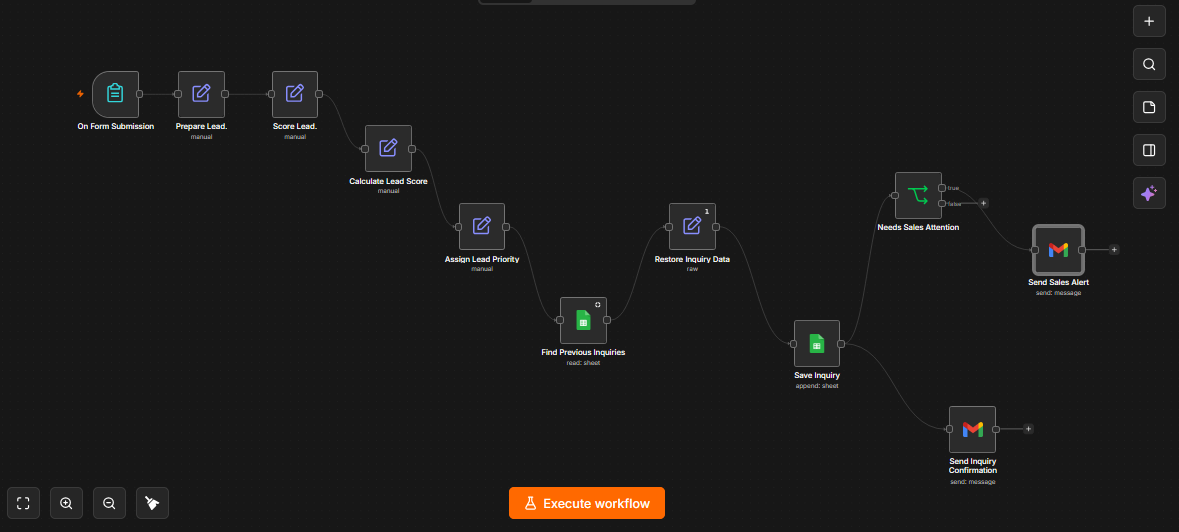
The form collects contact information, project details, service selection, budget, and timing. The workflow generates an inquiry reference, standardizes the email address for matching, and calculates a transparent score. It then assigns a priority, checks the existing tracker for that email, and restores the current inquiry with a returning-contact flag.
The inquiry is appended as a new row before the workflow reaches its email actions. Every successfully processed inquiry is intended to receive a confirmation. A separate branch checks whether the priority is High or Manual Review and sends an internal alert only for those categories. Follow-up status begins as New and is subsequently maintained by a person in the sheet.
Verified node inventory
| Node | Responsibility |
|---|---|
| On Form Submission | Receive the website inquiry |
| Prepare Lead. | Add inquiry ID and timestamp; trim and lowercase email |
| Score Lead. | Calculate service, budget, and timeline points |
| Calculate Lead Score | Add the three component scores |
| Assign Lead Priority | Apply service-review override and score thresholds |
| Find Previous Inquiries | Search Google Sheets by normalized email |
| Restore Inquiry Data | Restore the current submission, flag returning contact, set New status |
| Save Inquiry | Append the 17 mapped fields to the tracker |
| Send Inquiry Confirmation | Email the submitter an acknowledgment and request summary |
| Needs Sales Attention | Check High OR Manual Review |
| Send Sales Alert | Email the configured internal recipient |
The export contains 11 nodes. Save Inquiry connects directly to both the confirmation node and the attention check. The attention check’s True output connects to Send Sales Alert; its False output has no subsequent action. The original uploaded workflow was reviewed without modification.
Intake and scoring policy
Full name, email, project description, service, and budget are configured as required fields. Company name is optional. Start timeline is also optional in the supplied export, despite the earlier plan to require it. A blank timeline receives zero points. If timing must be mandatory for a future client, enable its Required Field setting; no new node is needed.
| Component | Selection | Points |
|---|---|---|
| Service | New Business Website, Website Redesign, or Ecommerce Website | 40 |
| Service | Other | 0 |
| Budget | Under $1,000 | 0 |
| Budget | $1,000–$2,999 | 20 |
| Budget | $3,000–$5,999 | 30 |
| Budget | $6,000 or more | 40 |
| Budget | Not sure yet | 0 |
| Timeline | Within 30 days | 20 |
| Timeline | Within 1–3 months | 10 |
| Timeline | More than 3 months | 5 |
| Timeline | Just exploring or blank | 0 |
The maximum score is 100. Budget and timeline expressions normalize dash characters before matching option labels. Unrecognized values fall back to zero points.
Priority rules run in this order: a zero service score becomes Manual Review; otherwise scores of 80 or more become High, 60–79 become Medium, and scores below 60 become Low. These are demonstration business rules, not an industry standard or a prediction of conversion probability. For example, an offered service with the largest budget can reach High even when the person is just exploring. A real agency should approve the weighting against its own sales process.
Returning contacts and record history
The lookup compares trimmed, lowercased email addresses. When a prior matching row exists, is_returning_contact becomes true. Each new inquiry is still appended, so a later request does not overwrite the person’s earlier project details.
Always Output Data is enabled on the lookup, allowing a first-time contact to continue even with no match. Restore Inquiry Data uses the current submission from Assign Lead Priority and runs once. This is appropriate to the present design of one form submission per execution. It is not a general-purpose batch-processing design.
The final screenshot shows three matching prior items feeding Restore Inquiry Data and one item leaving it. That is consistent with collapsing multiple historical matches into one current inquiry, rather than appending one copy per historical match.
Information stored
The tracker maps 17 columns: inquiry_id, submitted_at, full_name, email, email_normalized, company_name, project_description, service_needed, budget_range, start_timeline, service_score, budget_score, timeline_score, lead_score, lead_priority, is_returning_contact, and follow_up_status. Both sheet nodes target the same document and Sheet1 tab in the export.
The customer email contains their request details and a receipt acknowledgment. It does not disclose the internal score or promise pricing or availability. The internal alert contains contact details, project information, score, priority, returning-contact status, and instructions to review and follow up.
3. Test evidence
Evidence combines screenshots supplied during development, the exported configuration, and the builder’s reported test outcomes. Configuration review is not a substitute for executing a scenario. No additional live executions were performed as part of this document review.
| Scenario | Expected behavior | Evidence and result |
|---|---|---|
| Normal High inquiry | Offered service, $3,000–$5,999, within 30 days: 90, High; saved row and two emails | Builder confirmed row and email delivery; scoring screenshots show 40 + 30 + 20 |
| Returning contact | Same normalized email: new inquiry preserved, returning flag true | Builder confirmed true; screenshots of INQ-123 show confirmation and High alert with Returning contact: Yes |
| Low priority | Offered service, under $1,000, just exploring: 40, Low; confirmation only | Builder reported the specified test worked |
| Manual Review | Other, $6,000 or more, within 30 days: 60, Manual Review; both emails | Builder reported the specified test worked |
| Medium threshold | Offered service, $1,000–$2,999, just exploring: exactly 60, Medium; confirmation only | Builder confirmed the expected result |
| Missing email | Form blocks submission before processing | Builder confirmed workflow did not start |
| Invalid email format | Form rejects not-an-email | Builder confirmed submission was blocked |
All seven listed scenario types were reported successful, with screenshot support for selected scenarios. This is a small functional test set, not a statistical reliability measurement. The exact 80-point High boundary was proposed but not confirmed; testing stopped at the builder’s request. Google Sheets failures, Gmail failures, concurrent submissions, and duplicate-execution recovery were not tested. Blank timeline behavior follows from the configuration and was not separately demonstrated.
Repeated contact detection has been tested. Duplicate-submission prevention has not been implemented. Those are different capabilities: a second inquiry from the same person is intentionally kept, while an accidental rerun can also append another row and resend messages.
4. Short demonstration script
Suggested length: 2–3 minutes. This is a recording plan, not a claim that a demonstration video has already been produced. Use sample business information and email accounts you control. Hide account identifiers and unrelated inbox messages before publishing.
| Time | Show | Suggested narration |
|---|---|---|
| 0:00–0:20 | Project title and inquiry form | “This workflow helps a website agency organize incoming project requests, acknowledge each inquiry, and identify requests needing sales attention.” |
| 0:20–0:50 | Submit a sample website inquiry using the tested $3,000–$5,999 budget and within-30-days timeline | “The form collects the details the agency needs for an initial review: the service, budget, timing, and project description.” |
| 0:50–1:15 | Scoring and priority output | “This request receives 40 service points, 30 budget points, and 20 timing points. Its total of 90 places it in High priority under this agency’s rules.” |
| 1:15–1:40 | New Google Sheets row | “The workflow records the inquiry and marks whether this email appeared previously. Each new request remains a separate record so earlier conversations retain their context.” |
| 1:40–2:10 | Customer confirmation and internal sales alert | “The customer receives a confirmation. The sales team receives the details needed to begin follow-up, including priority and returning-contact status.” |
| 2:10–2:35 | Existing Low and Manual Review test evidence | “Low and Medium inquiries still receive confirmations. Requests for an unlisted service go to Manual Review so a person can assess whether the agency can help.” |
| 2:35–2:50 | Tracker follow-up status | “The automation handles intake and initial routing. The team owns the sales conversation and updates the follow-up status.” |
For a new recording run, derive the returning-contact explanation from the actual flag shown. Reusing a previously tested email will produce a returning contact. Do not repeatedly execute the append or send nodes solely to improve the recording; each execution can create another row or message.
5. Client-facing case study
Giving a website agency a consistent first response to incoming inquiries
Website inquiries arrive with different levels of readiness. A request for an urgent business website needs a different response from an early-stage idea or a request outside the agency’s services. When all of these sit in an inbox without a shared process, staff must repeatedly interpret the same information before deciding what to do next.
I built an n8n workflow that captures each inquiry through a structured form, evaluates it against explicit service, budget, and timing rules, and records the result in Google Sheets. A customer acknowledgment confirms that the request has been received. High priority inquiries and requests needing manual service review also generate an internal email containing the contact details and project context.
The design preserves every inquiry as its own record. It checks normalized email addresses against previous records and labels returning contacts without replacing their earlier requests. This gives the team context when someone follows up with a different requirement or an expanded scope.
Delivered functionality and observed results
The demonstration comprises 11 connected nodes, three scoring components, four priority categories, and a 17-column inquiry tracker. Functional testing covered seven scenario types, including repeat contact recognition and blocked email inputs. A documented returning-contact example, INQ-123, scored 90/100 and produced both the customer confirmation and an internal High priority alert showing Returning contact: Yes.
The demonstrated business result is a consistent intake and routing process: the request is recorded, the customer is acknowledged, and the team receives an alert when the rules call for attention. The intended benefit is less repetitive intake administration and a clearer follow-up queue. Time savings, response-time improvements, sales conversion, and financial returns have not been measured and are not claimed.
What a client would receive
A client implementation would include a form tailored to its services, approved qualification rules, an inquiry tracker, customer and internal email templates, returning-contact recognition, and operating instructions. The agency would supply its service list, budget expectations, recipient addresses, account access, and follow-up ownership. Hosting and operational safeguards would be agreed before accepting real customer traffic.
The present project demonstrates that implementation using n8n, Google Sheets, and Gmail. It does not include automatic quotations, appointment scheduling, a CRM migration, sales follow-up sequences, or an approval to begin project work.
Limitations and deployment considerations
The exported workflow is inactive and was demonstrated locally. It needs reliable hosting and a tested public form configuration for continuous external use. The exported file also includes account credential references, a spreadsheet identifier, and an internal recipient address; prepare a redacted copy before publishing it as a downloadable template.
Returning-contact recognition is based on an email match, not proof of identity. Email format checks do not verify mailbox ownership or deliverability. A different email address will be treated as a different contact, and concurrent first-time submissions may both be classified as new.
The inquiry reference uses the execution ID. It does not provide an independent business-level duplicate guard. Rerunning append or email steps can repeat their side effects. The workflow also has no dedicated error-recovery path or recorded email-delivery status. A saved row may remain if a later email fails, and the two outgoing branches are not guaranteed to complete independently when an error occurs.
The scoring reads selected options; it does not analyze the project description. The team must still assess technical feasibility, budget realism, and available capacity. Follow-up status is initialized to New but subsequent sales progress is maintained manually.
Before client deployment, the practical next work is reliable hosting, agreed field requirements, replay protection, failure monitoring and recovery, appropriate access to customer information, and testing of the resulting live configuration. These are production improvements beyond the completed demo scope.
How business impact could be measured later
For a real deployment, record the number of submissions, successful saves, acknowledgment failures, and sales alerts. Compare manual intake time before and after deployment using a defined sample. Track time from submission to the first human response separately from automated email time, then measure conversion by priority category over a suitable period. This would establish whether the scoring and alert rules improve the agency’s actual process.