Check stock thresholds, account for incoming orders, and send replenishment alerts with repeat-alert checks.
Inventory monitoring, purchasing guidance, and an automatically updated stock report
By Syed Farzam Saadat Project type: n8n automation portfolio prototype Implemented integrations: Google Sheets and Gmail Planned client integration: Shopify inventory Status: Built and manually tested with sample inventory; intentionally inactive pending client configuration and integration.
Project overview
I built an inventory-monitoring prototype that identifies products below a chosen stock threshold, calculates suggested replenishment quantities, updates a tracking sheet, and emails the person responsible for purchasing. The workflow records successful alerts and checks that history before sending another notification for the same product.
The project demonstrates the monitoring and notification logic using sample inventory in Google Sheets. Its intended client implementation would connect to Shopify so store inventory can feed the workflow without someone copying stock figures into a separate spreadsheet. That connection has not yet been built or tested in this project.
The practical goal is to give a business a clear answer to three questions: What needs attention? How much additional stock might be needed? Have we already alerted the responsible person?
The business problem
Recording inventory and reviewing inventory are different jobs. A business may have accurate stock figures but still depend on someone to inspect products, compare quantities with purchasing thresholds, check incoming orders, and decide which shortages need attention.
As the product range grows, those checks become repetitive. Information may also be split between the person maintaining stock records and the person placing supplier orders. An alert that includes the product, supplier, current stock, and suggested quantity can bring the relevant information together for review.
However, a small shop with only a few products may gain little from another stock email. This project is most relevant when a business has a specific gap in its existing monitoring or reporting process. If its current software already meets those needs, duplicating the same alerts would offer limited value.
The solution built
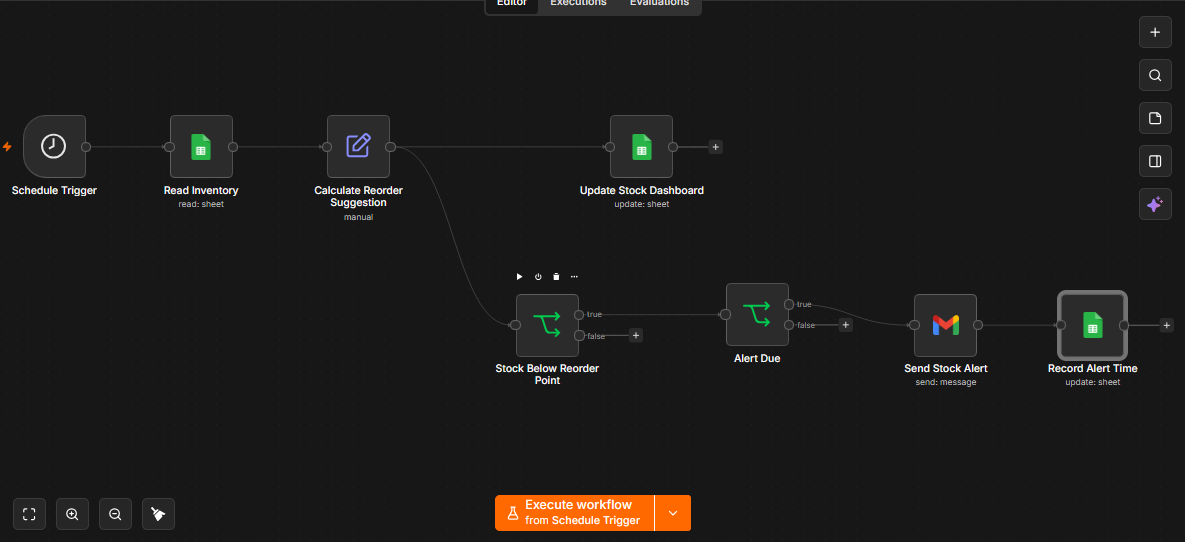
The prototype reads inventory records, calculates a status and replenishment suggestion for every product, and splits into two branches. One updates the stock report. The other checks whether stock is low and whether an email is due.
The report and email serve different purposes. The report shows the latest assessment for all products, including products with sufficient stock. The email brings qualifying low-stock products to the owner's attention. A product can remain low on physical stock while needing no additional purchase because an existing supplier order already covers the target quantity.
The workflow makes suggestions for human review. It does not contact suppliers, place purchase orders, approve spending, or change stock quantities.
How the workflow works
| Step | Plain-language explanation |
|---|---|
| 1. Start the check | A Schedule Trigger is configured for a daily 9 AM check. Tests were started manually. |
| 2. Read inventory | Read the product records from Inventory Tracker, Sheet1. |
| 3. Assess each product | Calculate whether stock is low, how many additional units are suggested, and the check time. |
| 4. Update the report | Match each existing row by SKU and update its status, suggested quantity, and last-check time. |
| 5. Identify low stock | Continue toward email only when current stock is strictly below the reorder point. |
| 6. Check alert history | Allow an alert when the last-alert field is blank or at least 24 hours have passed since the recorded alert. |
| 7. Send the email | Send one email per qualifying product to the configured internal recipient. |
| 8. Record the alert time | After a successful email action, update the matching product's last-alert timestamp. |
The exported workflow has eight connected nodes and one unused, disconnected Manual Trigger. The connected nodes are Schedule Trigger, Read Inventory, Calculate Reorder Suggestion, Update Stock Dashboard, Stock Below Reorder Point, Alert Due, Send Stock Alert, and Record Alert Time.
Reorder logic explained
The business chooses a reorder point and a target stock for each product. The reorder point determines when a warning is appropriate. The target determines the quantity the replenishment suggestion aims to reach.
For a product below its reorder point:
Suggested additional order = target stock − current stock − quantity already ordered
The suggestion is limited to a minimum of zero. Products at or above their reorder point receive a suggestion of zero in this version, even if their quantity is below the target.
| Sample product | Current stock | Reorder point | Target stock | Already ordered | Suggested additional order |
|---|---|---|---|---|---|
| Wireless Headphones | 8 | 10 | 30 | 0 | 22 |
| Phone Case | 25 | 10 | 40 | 0 | 0 |
| USB-C Cable | 4 | 15 | 50 | 10 | 36 |
For the cable, 50 minus 4 minus 10 gives a suggestion of 36 units. For the phone case, stock is sufficient under the chosen rule, so it does not generate a low-stock email.
In a separate test, the headphones' incoming quantity was increased to 25. The calculation became 30 minus 8 minus 25, and the workflow correctly returned zero instead of a negative order suggestion. The low-stock email still explained that the existing delivery should be checked.
This is a rule-based replenishment calculation. It does not forecast demand or account for supplier lead times, pack sizes, minimum order quantities, or purchasing budgets.
What the report contains
The current sheet combines sample input records and workflow-generated report fields.
| Information | Maintained by |
|---|---|
| SKU and product name | Entered as sample data in the prototype |
| Stock on hand | Entered as sample data; planned to come from the store integration |
| Reorder point and target stock | Business-defined settings |
| Quantity already ordered | Must come from accurate purchasing records; manually supplied in the prototype |
| Supplier name and email | Business-provided supplier mapping; sample suppliers used in testing |
| Stock status | Calculated by the workflow |
| Suggested order quantity | Calculated by the workflow |
| Last checked at | Updated during each successful report update |
| Last alert sent at | Updated after a successful email action |
The dashboard update changes only its intended reporting fields. It does not overwrite the last-alert timestamp. The separate alert-recording step updates only the alert timestamp for the matching SKU.
Here, “dashboard” means a tracking sheet. The project does not include a separate website, charts, or a dedicated inventory application.
Email and repeat-alert behavior
Each alert includes the product name, SKU, current stock, reorder point, target stock, incoming quantity, suggested additional order, and supplier contact details. It asks the recipient to review stock and deliveries before purchasing and explicitly states that no purchase order has been placed.
The prototype uses a rolling 24-hour check against the last recorded alert. It is not a once-per-calendar-day rule. Once 24 hours have passed, a product is eligible for another email at a subsequent workflow run if stock remains low.
This reduces repeat notifications during normal sequential runs. It is not a guarantee of exactly one email under all failure conditions: if an email succeeds but its timestamp cannot be saved, a later run could send another. Simultaneous runs can also read the same earlier timestamp before either updates it.
What was tested
The following results are based on the reviewed workflow export, execution screenshots, and inbox and spreadsheet checks reported during the build.
| Test | Observed result |
|---|---|
| Read sample inventory | Three product records were returned. |
| Identify low-stock products | Headphones and cables continued toward alerts; phone cases followed the sufficient-stock branch. |
| Calculate replenishment | Headphones returned 22 units and cables returned 36 units. |
| Account for incoming stock | Increasing headphones already ordered to 25 produced a zero suggestion, confirmed in the received email. |
| Assess all products | The revised calculation step returned three records, including sufficient stock with a zero suggestion. |
| Update the tracking sheet | The builder confirmed that product statuses, suggested quantities, and check times were written successfully. |
| Send alerts and record times | The builder confirmed the full run sent alerts and recorded their timestamps. |
| Immediately repeat the workflow | Both low-stock products followed Alert Due's False branch; the builder confirmed no additional emails arrived. The final canvas screenshot shows this routing. |
The evidence demonstrates the prototype's core behavior with sample data. It does not establish live Shopify synchronization, unattended scheduled operation, large-catalog performance, or a client deployment. A test proving renewed eligibility after 24 hours was not recorded. Invalid inputs, duplicate SKUs, concurrent runs, and service failures were not exercised in the documented tests.
Suitable business types
These are potential use cases, not claims of deployments for those businesses.
| Business type | Where this approach may help |
|---|---|
| Electronics and accessories retailers | Reviewing replenishment needs across many individual products and supplier relationships. |
| Beauty and personal-care shops | Bringing low-stock products to the purchasing team's attention with agreed stock targets. |
| Pet-supply retailers | Monitoring repeat-purchase products and separating new purchasing needs from stock already on order. |
| Homeware and gift retailers | Maintaining a shared stock-status report for owners and purchasing staff. |
| Clothing and footwear stores | Monitoring individual sizes and colors once variant-level inventory mapping is implemented. |
| Small wholesale or specialty retailers | Combining stock figures and supplier information into a consistent internal alert process. |
The best fit is a business with reliable source data, clearly defined stock rules, and a reporting or notification need its existing tools do not already satisfy. Multi-location businesses require location-aware matching before this prototype can be adapted safely to their operations.
Human responsibilities and automated work
The automation performs repeated checks, calculations, report updates, email decisions, and alert recording. The business defines the purchasing rules and remains responsible for the accuracy of its underlying inventory and incoming-order records.
In the current prototype, a person supplies the sample stock figures. In the proposed Shopify implementation, the integration would read store inventory automatically. Staff would still need to record physical receipts, adjustments, and purchasing activity in the appropriate business systems unless those processes are separately integrated.
The purchasing person reviews the suggestion, confirms supplier availability and delivery timing, and decides whether to order. An alert is guidance, not a purchasing commitment.
Planned Shopify implementation
The intended service is: Shopify inventory feeds a stock report, and the owner receives actionable replenishment alerts without copying inventory into a separate spreadsheet.
To deliver that service, the next implementation would need to:
- Establish an authorized connection to the client's store and confirm the inventory data available.
- Agree which inventory quantity represents stock available for the client's purchasing decision.
- Map products, variants, and locations to stable identifiers rather than rely on SKU alone.
- Retrieve store quantities and combine them with the client's thresholds, targets, and supplier mapping.
- Identify a reliable source for outstanding purchase quantities; a store connection alone does not prove this information is available.
- Extend the report updates to write the imported inventory quantities and handle new products appropriately.
- Test updates, alert behavior, and recovery using the client's chosen data source before activation.
The current calculations and notifications provide a foundation for that work. The project should be presented as a tested prototype with an integration plan, rather than as an already connected Shopify solution.
Deployment and practical limits
The export is intentionally inactive. Its schedule is configured for 9 AM, but no workflow-specific timezone is saved. Deployment would set the client's timezone, verify the schedule, and activate the workflow on an environment that remains running.
The current design assumes unique SKUs and valid numeric inventory fields. Before client use, input validation and clear handling of missing or invalid timestamps would be needed. A malformed nonblank alert timestamp can prevent an alert from becoming due under the present expression.
The 24-hour waiting period also applies if stock falls further or recovers and then drops again within that period. There is no separate urgent stockout alert or reset on recovery. Those behaviors should be agreed with the client rather than assumed.
There is no custom failure-notification workflow, purchasing approval process, supplier grouping, or purchase-order creation in this build. Credentials, destination sheets, recipients, and operating rules would be configured for each client. The original workflow export is a working configuration, not a sanitized public template.
Results and business value
The demonstrated result is a working flow that turns three sample inventory records into updated stock assessments and targeted emails. It accounts for incoming quantities, avoids negative suggestions, and suppresses immediate repeat alerts once successful sends are recorded.
Potential business value comes from reducing repetitive review and making purchasing information easier to act on. No time savings, revenue gains, stockout reductions, or client results have been measured for this prototype.
A client pilot could measure time spent reviewing replenishment, usefulness of the suggestions, repeated-alert frequency, and whether the team acts on qualifying shortages sooner. Those observations would establish the value of the implementation in that particular business.